


Version Design F/X -Management Plugin Within CAD
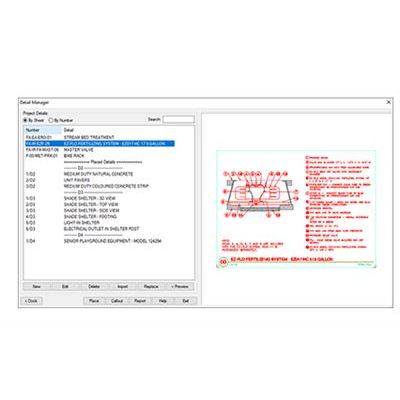
The detail tools make it easy to customize, design, save, edit, call out, and organize your details. Share organized, consistent, and up-to-date details within CAD. This detail management system makes it easy to customize, design, save, edit, call out, and organize your details.
Unlimited Technical Support
Any time you have issues with or questions about the software, reach out and get world-class support from us. You can submit a tech support ticket, email, or call. (Phone hours are 8 a.m. to 5 p.m. Pacific.) Bottom line: If you’re having trouble, we’re here to help – it’s that simple.
Weekly Updates
We update the software at least once a week, typically each Friday. Bug fixes are often sent to users the same day.
Power Tip Videos
We`re continuously investing in your successful training. Learn the latest detail features and techniques in these weekly three-minute videos. See all Details Power Tips.
Our detail management system makes it easy to customize, design, save, edit, call out, and organize your details.
- Detail Organization
- Content Libraries
- Detail Creation
- Place Details
- Callouts
- CAD Tools
- Unlimited Technical Support
Share organized and up-to-date details.
Working with AutoCAD® details has never been this simple!
Detail Organization
Work with details in CAD, file them into a single master library. Everyone in your office can access every detail from every project.
- Access your detail library in CAD
- Search functionality
- Organize details how you want
- Check out a preview before you place
Keep it all together.
We make it easy to keep the details in your library in order. You can move, edit, replace, and even add notes to them.
Detail Creation
Give your plans the exact look you`re after, down to the last detail. (Pun intended.) Customize labels, layer and line colors, fonts, title blocks, plotting preferences, and more. Apply your standards to every project, office-wide.
Fonts included with Land F/X
We``ve added some incredible font options for customizing your Land F/X installation, which now include the rare Adobe Graphite TTF – available for use in AutoCAD exclusively via Land F/X plugins.
Detail Enlargement
Quickly create a close-up view of a portion of your detail. Scale it to your liking, and the dimensions will stay the same.
Place Details
Place details across multiple sheets. Once placed in a detail, blocks, hatches, callouts, and text will scale automatically and remain standardized.
Callouts
Call out a detail in seconds, adding its number and title to the callout with a single click. Callouts update automatically if you make changes.
CAD Tools
Get a quiver of time-saving CAD tools that speed up your most tedious tasks – all under one roof.
BatchMan
Batch file processor
XLayer
Change Xref layer properties from your main drawing
SuperJoin
Clean chaotic linework into polylines and group them on single layer
PHATCH
“Paint” hatches using specially designed brush shapes
Polydivide
Split closed polyline areas accurately
Nuke
One-click file cleaner
Polyoptimize
Simplify a polyline by decreasing the number of segments
BatchMan
Maintain drawing standards across your entire library. You can select any number of DWG or DXF files (or even entire folders of files), and use BatchMan to perform any of several common actions on all of them at once.